 Indian in Saudi Arabia
· indianinsaudi · hajj-umrah · 2 min read
How to Check Your Hajj Insurance Status Online
Are you planning on taking part in the Hajj this year? One of the most important things to ensure before you depart is that your Hajj insurance is valid and up to date. Fortunately, checking the status of your insurance is now easy and convenient thanks to the Council of Health Insurance (CHI, formerly CCHI) website. Health insurance for pilgrims coming from abroad is mandatory and is issued as part of the Hajj or Umrah visa. In this guide, we’ll walk you through the steps of checking your Hajj insurance status online.
Step 1: Go to the Council of Health Insurance Website
The first step is to open the CHI Visitor, Tourist, or Pilgrim Insurance Inquiry service and click Start Service. (The old eservices.cchi.gov.sa address no longer works.) The Insurance Authority also runs a Hajj & Umrah Insurance Inquiry service that accepts a passport, visa or border number.
Step 2: Enter Your Passport Number
Once you’re on the website, you’ll need to enter the passport number that was used to issue the insurance policy. CHI asks Hajj and Umrah pilgrims to search with the passport number.
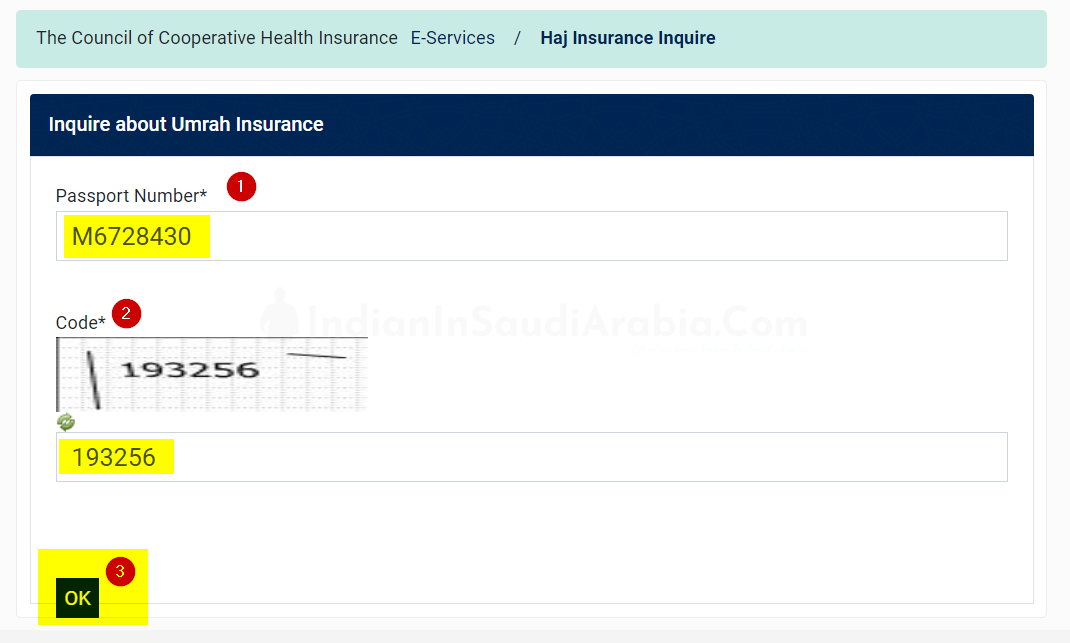
Step 3: Enter the Image Code and Click OK
After entering your passport number, you’ll need to enter the image code, agree to the personal-data consent and then click Search.
Step 4: View Your Complete Insurance Information
Once you’ve followed the above steps, you’ll be able to view your complete insurance information in the following window.
Checking your Hajj insurance status online is quick and easy. By following these simple steps, you’ll be able to ensure that your insurance is valid and up to date before you depart for the Hajj.