 Indian in Saudi Arabia
· indianinsaudi · travel · 3 min read
How to apply for Bahrain Visit Visa from Saudi Arabia

In this article, we have explained the Prerequisites, Bahrain Visit Visa Fees and a Quick guide on How to apply for Bahrain Visit visa or eVisa through the Official Portal of Kingdom of Bahrain, Ministry of Interior Nationality, Passports & Residence Affairs (NPRA)

📄 Pre-requisites: Documents Checklist
- Copy of Passport First and Last Page (Validity must cover stay Period)
- Copy of return air ticket. (You Can also book a refundable Dummy Ticket)
- Copy of a bank statement under the visitor’s name covering the last 3 months (Preferably Stamped). NPRA’s pages for the GCC-resident eVisas list only your passport and a copy of your iqama (with at least 3 months’ validity) as required documents, but the portal may still ask for a bank statement; Bahrain’s government services catalogue mentions a regular income of BD 300–500 a month or BD 150 for each day of the visit.
- Copy of a Hotel Booking in Bahrain (You can use Booking.com Hotels that you can cancel later for Free)
- Self Signed Letter - Convert to Word and Edit, After Editing Save it as SignedLetter.pdf
💵 Bahrain Visa Fees
The Bahrain eVisa fees for GCC residents (such as iqama holders in Saudi Arabia), as listed by NPRA in 2026, are as follows
| Type of Fees | Single Entry (2 Weeks) | Multiple Entry (3 Months) | Multiple Entry (1 Year) |
|---|---|---|---|
| Application fee: | BD 5.000 | BD 5.000 | BD 5.000 |
| Visa fee: | BD 5.000 | BD 12.000 | BD 40.000 |
| Total fee: | BD 10.000 | BD 17.000 | BD 45.000 |
Bahrain Visit Visa Fees Structure
Please note that the application fee is not refundable under any circumstances. Fees were revised from the older BD 4 application fee; Bahrain’s national services portal still shows some older figures, so check the amount shown on evisa.gov.bh before paying. Source: NPRA, Two-Week eVisa (GCC Residents)
💵 How to Apply for Bahrain Visit Visa
1- Visit website https://www.evisa.gov.bh/VISA/visaInput
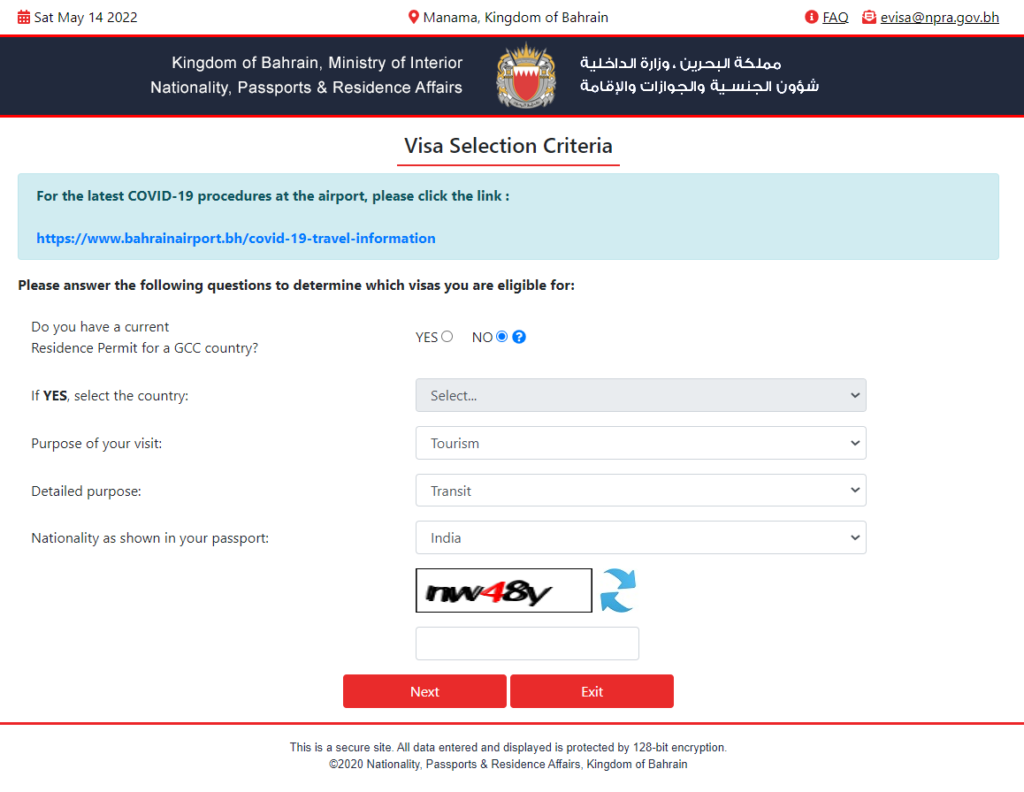
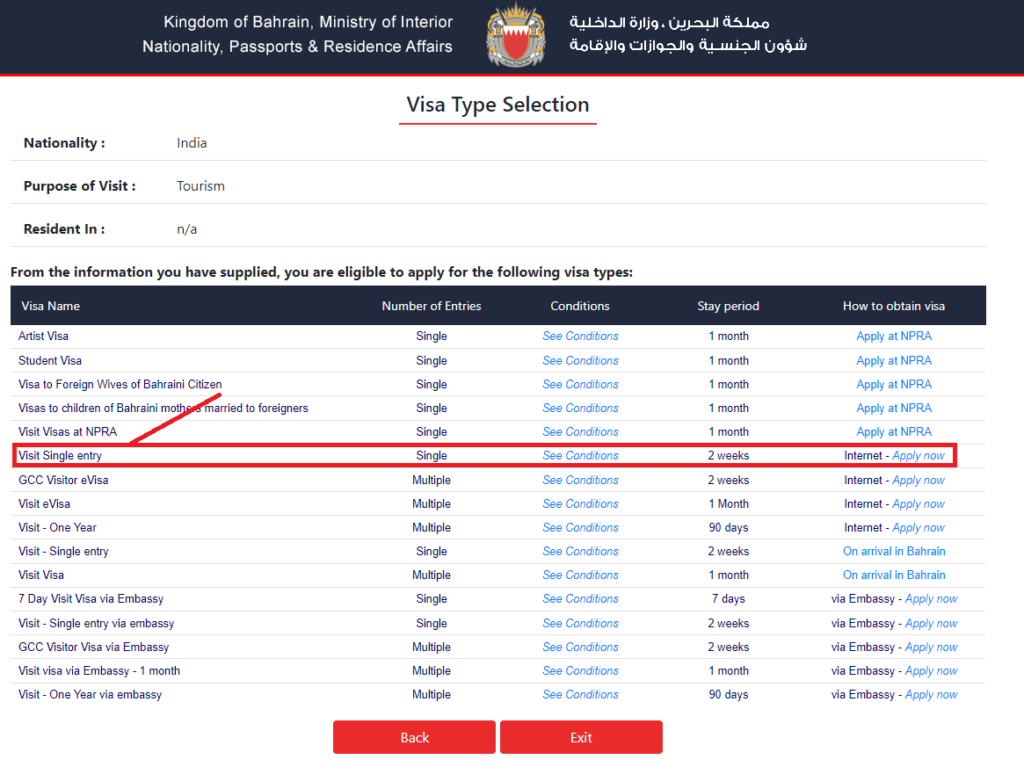
2- Select the Highlighted Option, you can also choose other available options.
Read: Can you Obtain Saudi Citizenship?
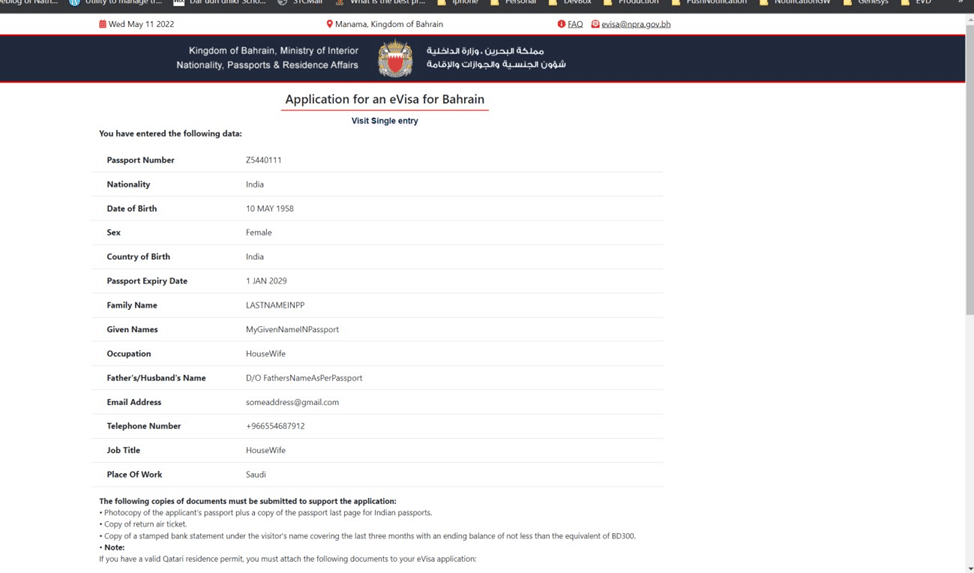
3- Fill the application form - Sample filled for your reference
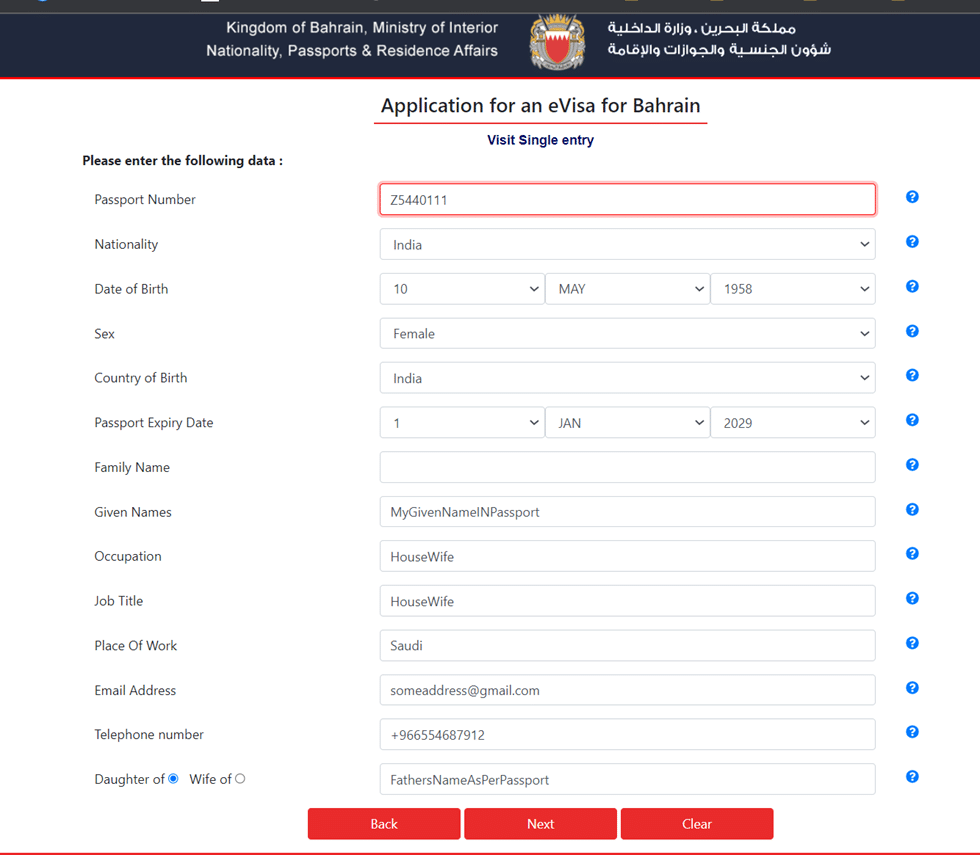
💡 Tip: If you are applying visa for multiple dependents, it is best to provide a single Email ID and Phone number for all of them so you can receive the fee payment notification on a single Email.
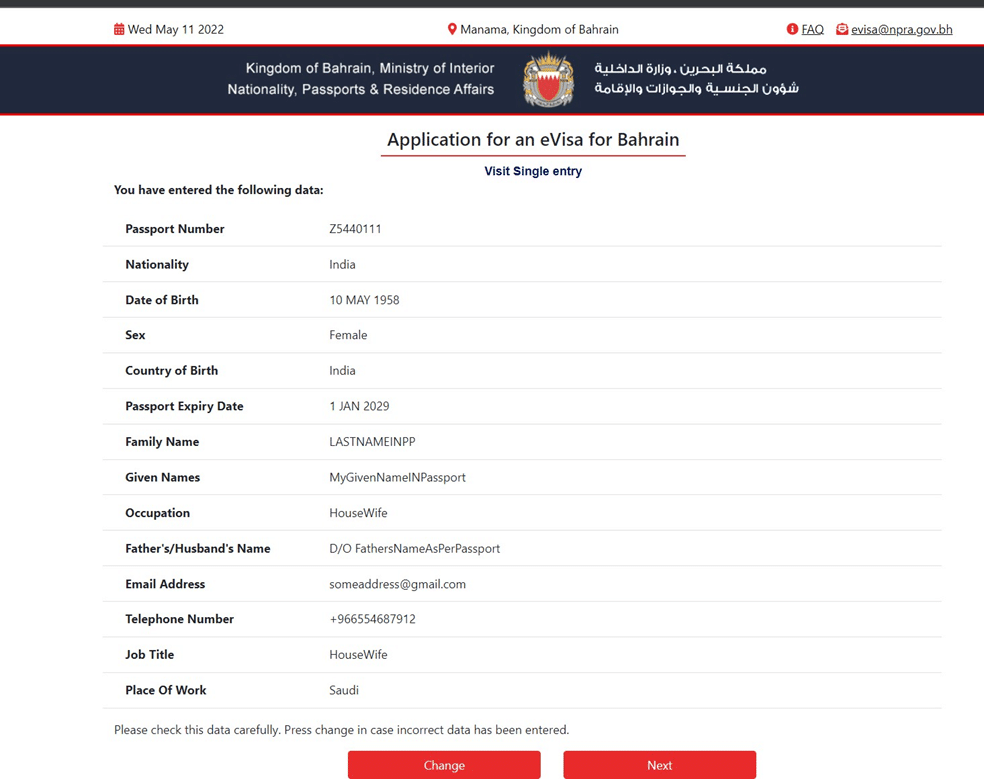
4- Confirm the details and Select NEXT
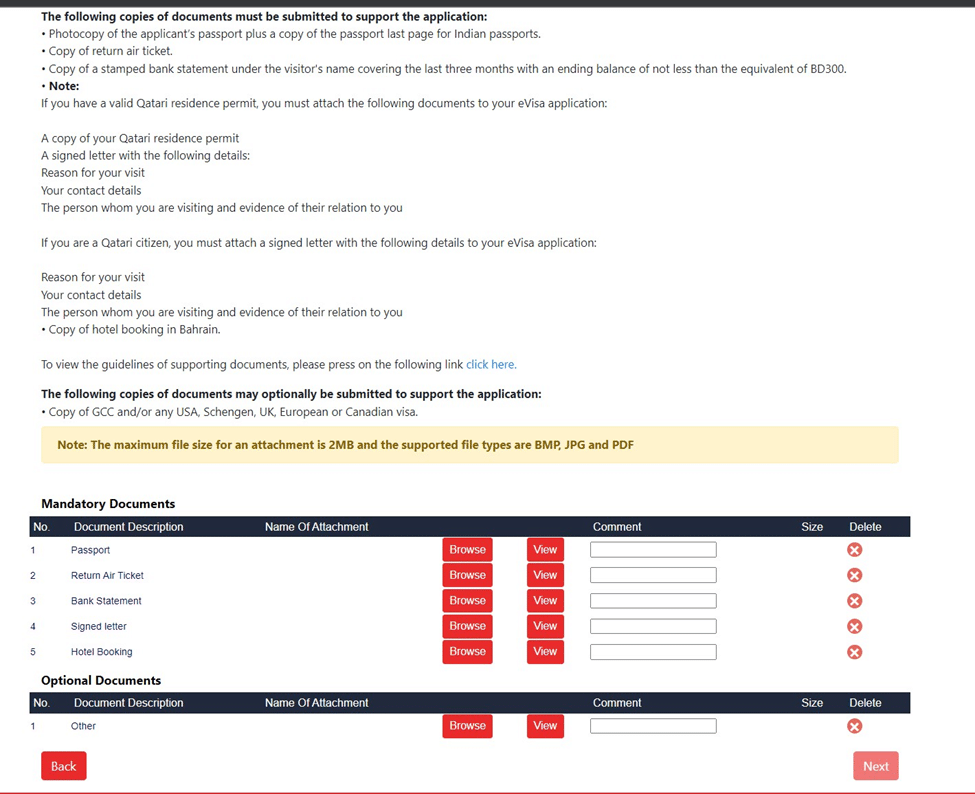
5- Attach the requested documents
- Passport: Upload Copy of passport - Front & Back
- Return air ticket: Upload Ticket Copy OR your SignedLetter.pdf
- Bank Statement: Upload your Bank Statement (Preferably Stamped)
- Signed Letter: Attach your SignedLetter.pdf
- Hotel Booking: Upload the booking.com reservation OR Attach your SignedLetter.pdf
- Other :Upload the Attach your SignedLetter.pdf
Click Next, it will direct to your payment page.
Make the payment and save the APPLICATION REFERENCE NUMBER.
6- Receive Visa Approval Email
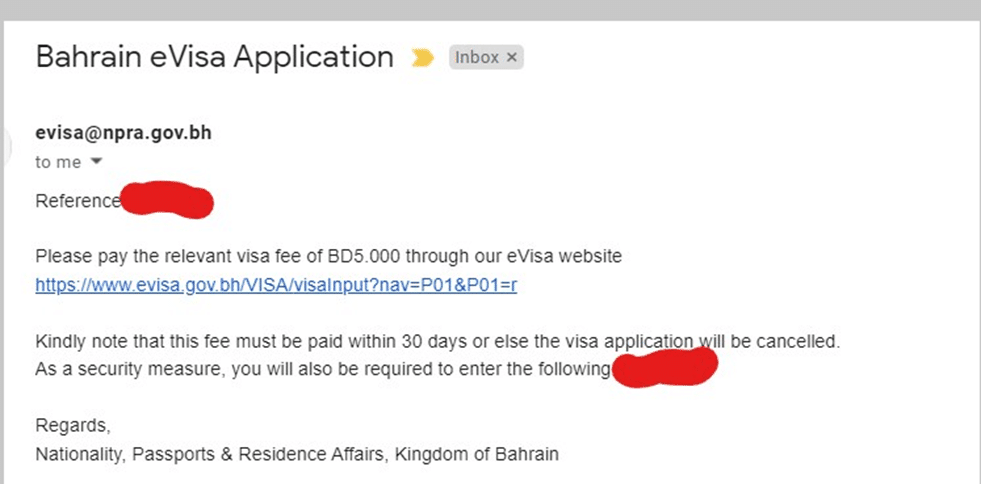
Usually within 48 hours of Application Submission (NPRA lists a processing time of 1 working day), You’ll receive an Email for Visa Fee Payment.
Click on the following Link to Make the visa Fee Payment - https://www.evisa.gov.bh
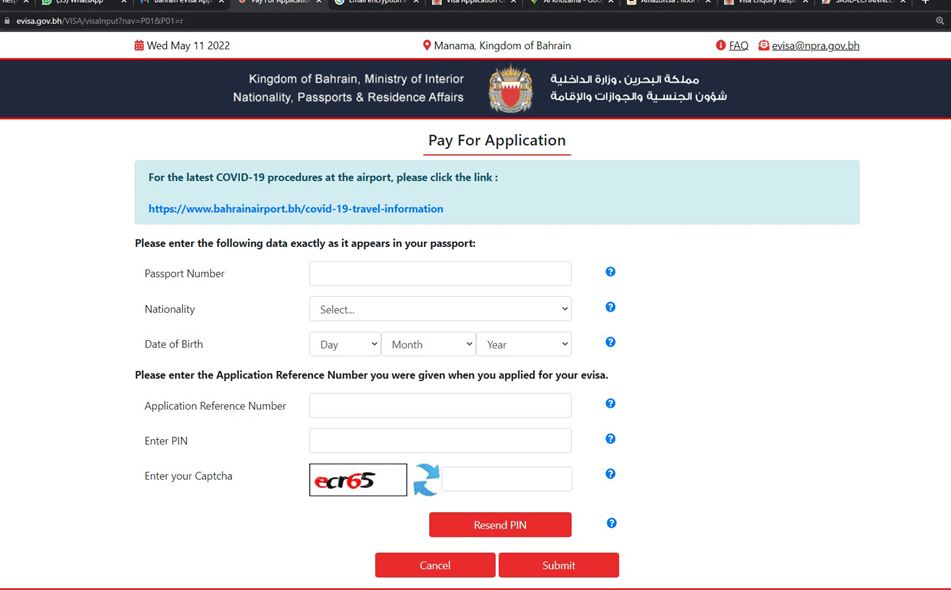
7- Fill the Pay For Application data and proceed for payment
Make the payment and wait to get your visa approval in your email.
Application Reference Number is the number that you saved in STEP 5. If you forgot to save Application Reference Number, It will be available on your Email.
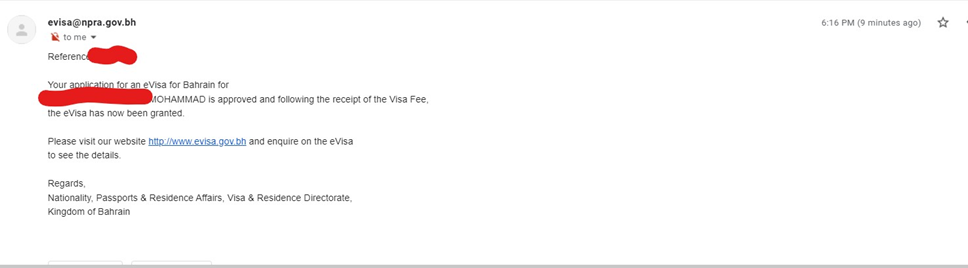
8- Bahrain Visa Approval Confirmation Email
Within 30 Minutes of Payment, You will obtain Visa Confirmation Email. Save the Soft copy for reference. You don’t need to print it.
Please note that this Visa must be used within 3 months of issuance, or it becomes invalid.
💡 Note: This visa can be extended at the Nationality, Passports and Residence Affairs office (NPRA) in the kingdom of Bahrain on payment of a fee (BD 25 per extension, as listed by NPRA).
Recommended Read: A Brief Guide to New Saudi Visa Stamping VFS Tasheel