 Indian in Saudi Arabia
· indianinsaudi · personal-services · 6 min read
How to Check Court Case Details Online

Are you living in Saudi Arabia and caught up in the hassle of court cases? Whether it’s attending court sessions, following up on case details, or downloading court decisions, the process can feel overwhelming. But what if you could do all this from the comfort of your home, just using your mobile phone? This guide will take you step-by-step through how to access your case status, check court case details, and even download important legal documents using the official Najiz portal and related platforms.
With the right tools and knowledge, you can stay fully informed about your legal matters without running from one office to another. Let’s dive into how you can make this happen.
Table of Contents
Before we jump into the technical steps, it’s important to understand what is Najiz Portal
- Najiz Portal: An official Ministry of Justice platform that provides access to detailed information about your court cases, sessions, and legal documents.
📱 How to Access Your Case Details on Your Mobile Phone
Follow these simple steps to start checking your court case details right away:
Open Your Mobile Browser: On your phone, open any browser such as Chrome or Safari.
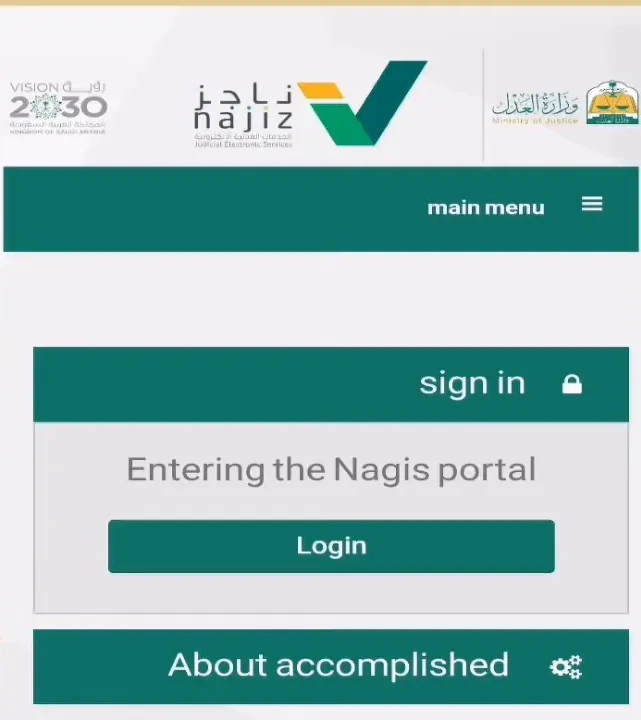
Visit the Najiz Website: Type https://najiz.sa in the address bar. This is the official portal of the Ministry of Justice.
Login with Nafath: Tap login through National Nafath (National Single Sign-On) and enter your Iqama number. Najiz shows a number on screen.
Approve in the Nafath app: Open the Nafath app on your phone, open the new request, choose the same number shown on Najiz and confirm with your face or fingerprint. There is no SMS OTP step with Nafath. (You can also use the Najiz mobile app.)
Access Your Account: Once logged in, you will land on the main dashboard where all your case-related information is available.
⚖️ What can you do with the Najiz Portal
Once logged in, the portal offers a range of features to help you track and manage your case efficiently:
Personal Information: View your registered personal details to ensure everything is correct.
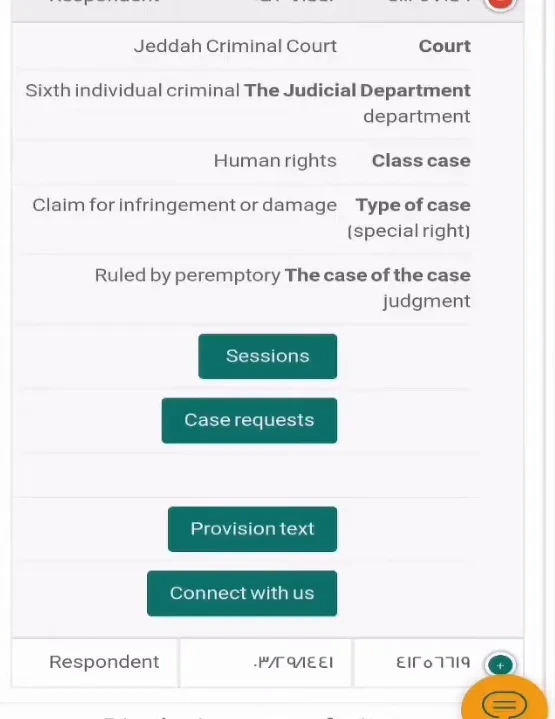
Case Details: Check the status of your cases, including the type of case, judicial department, and applicable rules.
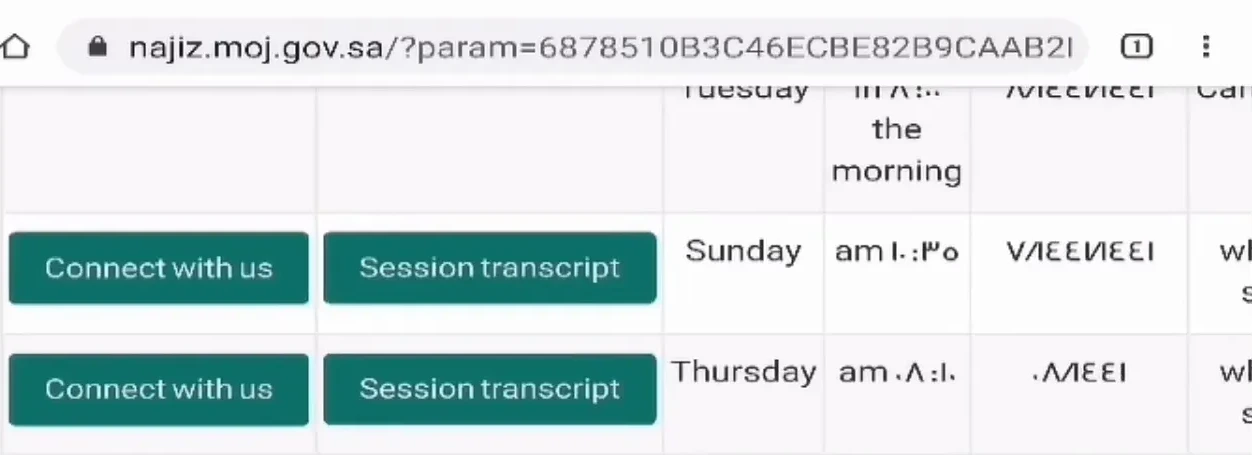
Court Sessions: See upcoming court session dates, past session records, and any cancellations.
Case Decisions: Access final rulings and decisions related to your case, available for review and download.
Notifications and Alerts: Receive automatic alerts for any changes or updates in your case status, such as new hearing dates or court orders.
Objections and other requests: Submit an objection (appeal) against a judgment, a petition for reconsideration, or a request to correct or clarify a judgment, from inside the case.
These features keep you fully informed and allow you to take timely action without missing important deadlines.
🗓️ How to Check Court Sessions and Appointment Dates 📅
Keeping track of your court sessions is crucial. The Najiz portal makes this easy by listing all your scheduled sessions in detail:
Dates of previous hearings, including those canceled or postponed.
Details of upcoming court sessions with timings and court locations.
Information about the type of session, such as judicial hearings or administrative meetings.
For example, if you have three sessions related to a case, you can see each one’s status and notes about any cancellations or rescheduling.
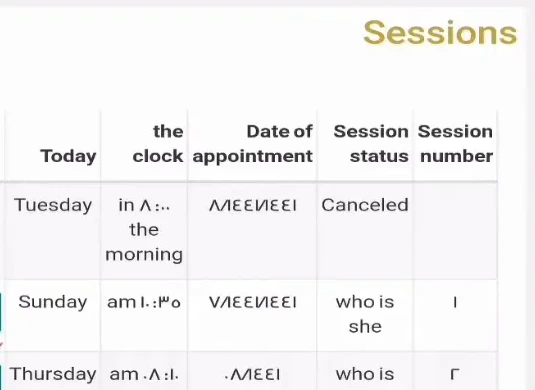
This way, you never lose track of your court appointments and can plan accordingly.
📄 Downloading Case Decisions and Court Documents
Often, having a physical or digital copy of court rulings and decisions is necessary for legal processes or personal records. Najiz portal allows you to:
View detailed court decisions with timestamps and related case information.
Download these documents (usually as PDF) directly to your mobile device or computer.
Print official copies for submission to police stations, embassies, or other authorities.
For instance, if you need to submit a court decision to a police station, you can easily download the official PDF and print it out, saving you multiple trips and delays.
🔔 Stay Updated with Notifications and Alerts
One of the most helpful features of the portal is the alert system. Once you have registered your case details, you will receive notifications such as:
Upcoming court dates and session reminders.
Changes or cancellations in court sessions.
New decisions or rulings issued in your case.
Important legal updates related to your case status.
This proactive alert system helps you avoid missing court dates or necessary filings.
✍️ How to Object to (Appeal) a Court Decision
If you are unsatisfied with a ruling, Najiz lets you file an objection (appeal) to the judgment (الاعتراض على الحكم) online. According to the Ministry of Justice (MOJ – Appeal judgment):
Log in to Najiz with Nafath and go to “All Electronic Services” → “Judiciary” → “Appeal judgment”.
Click “New Application”, select the case, then “Applications” → “New application” → “Appeal judgment”.
Select the judgment you want to appeal, enter your grounds and attach supporting documents, then click “Submit application”.
You receive the application number by SMS, and you can track its status in Najiz.
Objections must be filed within the deadline shown in the case, so don’t wait. Najiz also has separate services for a petition for reconsideration and for correcting or clarifying a judgment. If someone files for you, they need a valid power of attorney that includes the right to plead and appeal.
❓ Frequently Asked Questions (FAQs) ❓
What is Najiz and why should I use it?
Najiz is the official Ministry of Justice portal in Saudi Arabia that provides online access to case details, court sessions, and decisions. It simplifies legal case management by allowing you to track your case remotely.
Can I download court decisions from the portal?
Yes, you can view and download official court decisions and rulings directly from the Najiz portal, usually as PDF.
What if I want to challenge a court decision?
Use the “Appeal judgment” (objection) service inside your case on Najiz, within the deadline shown in the case. You get an application number by SMS and can track the status online.
Are court session dates and cancellations updated in real-time?
Yes, the portal provides up-to-date information on court sessions including any cancellations, rescheduling, or new appointments.
Can I get notifications about my case status?
Yes, once you are registered and logged in, you will receive alerts and notifications about any important updates related to your case.
What should I do if I don’t understand how to use Najiz?
You can contact legal advisors or official support channels for guidance. Many community groups and social media channels also provide helpful advice.
For those needing deeper assistance, don’t hesitate to connect with legal advisors who can support you through the process. With the right approach, you can navigate your legal challenges confidently and efficiently.
Stay informed, stay prepared, and take charge of your case with Najiz.
- najiz